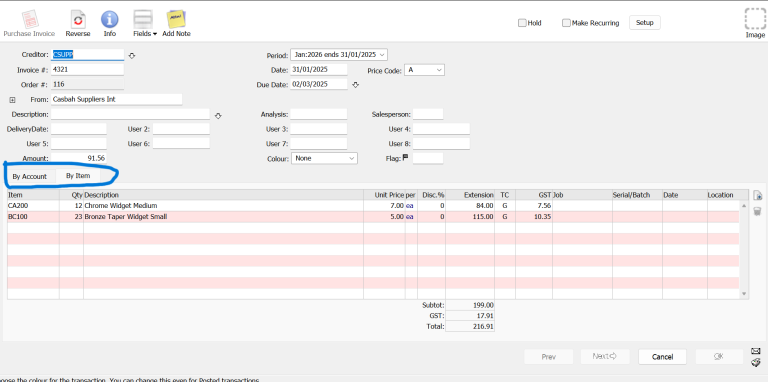
How to Create a Purchase Invoice in MoneyWorks
Step-by-step guide to entering supplier invoices in MoneyWorks: select the creditor, allocate expenses or items, check GST, post, and put invoices on hold.

This page contains MoneyWorks guides for invoicing, payments, GST, reports, setup, and daily accounting tasks.
Prefer to learn with a trainer? See our MoneyWorks training courses for hands-on sessions online or at your office.
Written MoneyWorks tutorials with screenshots, worked examples and troubleshooting tips. New guides appear here automatically.
Step-by-step guide to entering supplier invoices in MoneyWorks: select the creditor, allocate expenses or items, check GST, post, and put invoices on hold.
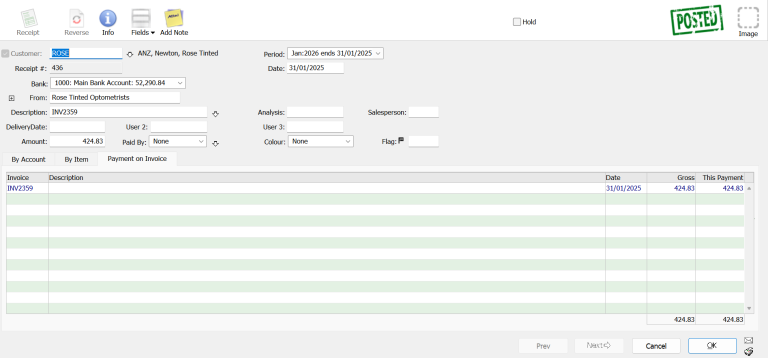
Step-by-step guide to recording customer receipts in MoneyWorks: allocate payments to invoices, handle partial payments and pay multiple invoices with one receipt.
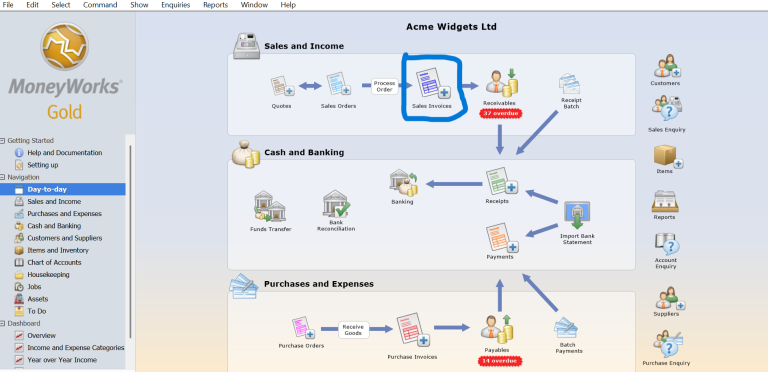
Step-by-step guide to creating a sales invoice in MoneyWorks: select the customer, add items, check GST, save and post, then print or email the invoice.

AI can reduce repetitive bookkeeping work, but it cannot replace proper financial review. Learn which tasks can be automated and where human judgment is still essential.

Home How to Upload Custom Forms and Report Templates in MoneyWorks MoneyWorks allows businesses to customise invoice layouts, purchase orders, statements, reports and other documents according to their operational requirements. When you create or modify a custom form or report on your computer, the file is initially stored locally. If your company uses MoneyWorks Datacentre,…

MoneyWorks AI Accounting Software introduces optional AI support. Learn what it does, how access is controlled, what it costs, and why it matters for Singapore SMEs.

InvoiceNow allows Singapore businesses to send and receive invoices electronically through the nationwide Peppol e-Invoicing network. Instead of

How to Backup Moneyworks Data – Manual and Auto Backup Data loss is one of the biggest risks
Short videos showing MoneyWorks tasks on screen, from setup and GST to banking and AI.
Learn how to login to MoneyWorks when you work from home
Learn how to clone existing company file & keep chart of accounts to new company file. Save time!
Learn how to create a chart of account using the Moneyworks software.
Introduce MoneyWorks AI and show how supported AI tools such as Claude can work with MoneyWorks to help users ask questions in plain English, analyse accounting data, prepare reports, and review business information more efficiently.
AI can help read scanned receipts, supplier invoices, handwritten documents, blurred receipts, and PDF attachments, then assist with preparing cash payment
AI can help read an Excel workbook where each worksheet contains one day’s sales transactions, extract the total sales amount per day, and assist with creating daily sales invoices in MoneyWorks
how to import a bank statement and use AI to identify the transactions and automatically generate: 1. Sales invoices for incoming receipts. 2. Bank payments for outgoing transactions. 3. Transaction records needed for bank reconciliation
Power BI allows you to transform raw data into interactive dashboards and reports, delivering actionable insights to support better decision-making
Explains the key steps to configure InvoiceNow
Learn how to change from old GST Tax Rate to new date with effective date
You can upload bank statement (csv format) into Moneyworks and set simple rule so that transactions (payment / receipt) can be created automatically. No more manual entries.
Invoice amount and number are filled up automatically when you customer scan the QR Code from their mobile phone
After you record a payments suppliers, you can then save it into bank file and upload it to your bank for processing.